Lucidchart for Microsoft Word
Add professional diagrams, flowcharts, mind maps, and more to your Microsoft Word documents. Lucidchart helps make your reports, proposals, and manuals stand out.
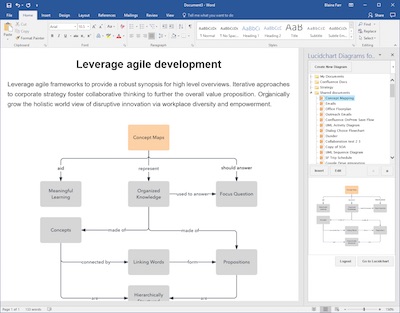
How to integrate
It's easy to install in Word, PowerPoint, and Excel.
- Open up Word, PowerPoint, Excel, or go to the Microsoft Store
- Go to Insert > My Add-ins
- Search for a Lucidchart trial account
- Create and insert your first diagram

Diagrams made easy
Our drag-and-drop editor makes it easy to arrange your flowchart elements just the way you like. Just click and drag your mouse to connect shapes with a line, and even add an image to make your flowchart stand out. Our intuitive interface keeps it simple.

Visio import/export
We’re here to help you get your work done right, without stress. We make Microsoft Visio file imports and exports easy so there’s no need to do anything twice. Plus, you can continue to work with any of your co-workers who haven’t made the switch from Visio yet.

Fully integrated
Lucidchart is integrated with G Suite, so you can use your existing Google login and sync with Google Drive. Lucidchart also puts content from YouTube, Dropbox, and Facebook right at your fingertips. Everything you need is right here.

Publish and share
We’ll help you make a professional-looking flowchart that you’ll want to share, and then we’ll help you spread the word. Publish your flowchart as a PDF or image and easily include it in a report or presentation. Or embed it right on your webpage!