Log in

How to master meeting minutes

Reading time: about 7 min

Topics:

  • Teamwork and collaboration

Key takeaways

  • Minutes are essential forms of meeting documentation that promote increased accountability, transparency, and organization.

  • Effective meeting documentation isn’t one-size-fits-all. It requires tailoring your style and format to match your organization’s needs and whether the meeting is in-person or online.

  • A dynamic, flexible visual collaboration solution is the answer to complex documentation needs. It bridges the gaps created by diverse meeting formats and provides essential, centralized functionality for creating, editing, organizing, and sharing meeting minutes.

Minutes of the meeting, sometimes referred to as MoM or simply “minutes,” are documentation of what occurs during a meeting: decisions, next steps, deliverables, and more. These are important recaps to return to later and remember what happened during a particular meeting.

Interestingly, the term “minutes of the meeting” wasn’t actually named because of the measurement of time it refers to. In reality, the phrase likely was derived from the Latin term “minuta scriptura,” which is literally translated to mean “small writing” and could refer to the succinct nature of meeting minutes. They may be “small,” but minutes can considerably impact the effectiveness of your meetings.

The impact of meeting minutes

Too often, meeting minutes are recorded as a formality without an intentional approach. In reality, there are many benefits to strategically documenting minutes at every meeting. Here are a few reasons why:

  1. Meeting minutes increase team confidence and foster trust

Sharing the minutes of an important meeting is inclusive toward those who couldn’t attend. This practice fosters trust and allows everyone to take a figurative seat at the table, building team trust so members can work confidently together.

  1. Meeting minutes promote accountability

Have you ever left a meeting and realized your takeaways weren’t as clear as you initially thought? Maybe you second-guess whether you’re responsible for any action items or feel unsure of the next steps. Thorough minutes eliminate this type of uncertainty. They ensure everyone knows what they’re in charge of, cut down on miscommunication, and ultimately promote accountability amongst stakeholders.

  1. Meeting minutes offer legal protection

In the case of an unforeseen audit or investigation, meeting minutes can serve as vital documentation to clarify events during a session. Minutes act as records of what actually happened, solving any potential discrepancies that arise.

Meeting minutes vs. meeting notes vs. meeting agendas

It’s easy to feel confused by the different types of meeting documentation. You may feel like an agenda can inherently serve as meeting minutes. Or you may conflate meeting minutes with meeting notes. In reality, minutes, agendas, and notes are three distinct forms of meeting documentation that serve different purposes.

An agenda provides an outline of topics before a meeting. Agendas prepare participants and guide the flow of the session once it starts, so talking points aren’t forgotten. Meeting minutes, however, aren’t recorded until the meeting actually begins. They document the key points discussed and the decisions made. Minutes are also traditionally organized by importance or relevance, while agendas are organized chronologically.

Meeting notes are similar to meeting minutes, but the most significant difference is the approach. Notes are more informal and are often taken for personal use. On the other hand, meeting minutes are organized more formally and strategically with the intention of being shared with others.

Meeting minutes in a hybrid environment

Meeting minutes are essential for both in-person and online team meetings. Here are a couple of things to keep in mind about the differences:

  • While recording the meeting can be beneficial either way, it’s especially vital for remote meetings to fill in gaps caused by unexpected tech issues, such as if your screen freezes or your internet cuts out.

  • Remember to test your technology before the meeting starts. You’ll need to rely on your speakers and a strong internet connection to follow along and take accurate notes. Verify audio and internet quality with enough time to troubleshoot if problems arise. 

Hybrid work environments make solely offline, in-person meetings impossible. But while some may feel hesitant to host an important meeting online, its quality and effectiveness can be just as significant! Consider a visual collaboration solution like Lucid to help you with meeting minutes. Lucid’s flexible canvas allows you to seamlessly document a meeting, organize notes, assign next steps and action items, and share your minutes afterward.

Styles of meeting minutes

There are different ways to approach taking meeting minutes. Here are three styles to consider:

  • Action minutes: Action minutes focus on the most critical takeaways from the meetings, like decisions made and actions taken. This style typically leaves out many details so that minutes can be reviewed and understood quickly. You’ll often see this style in board or council meetings.

  • Discussion minutes: Rather than just the key takeaways, discussion minutes will attribute ideas to specific individuals and include notes about deliberation for more thorough documentation. Discussion minutes are generally the style used in an average business meeting.

  • Verbatim minutes: Verbatim minutes aren’t traditionally used in a professional setting and are more likely to be seen in legal proceedings or public hearings. They’re a word-for-word meeting transcript, typically taken by a designated professional who can write in shorthand to capture everything.

How to write meeting minutes

Feel free to adopt your own process and style when taking meeting minutes. Here are some basic steps to start with.

1. Decide how you’re going to organize your notes 

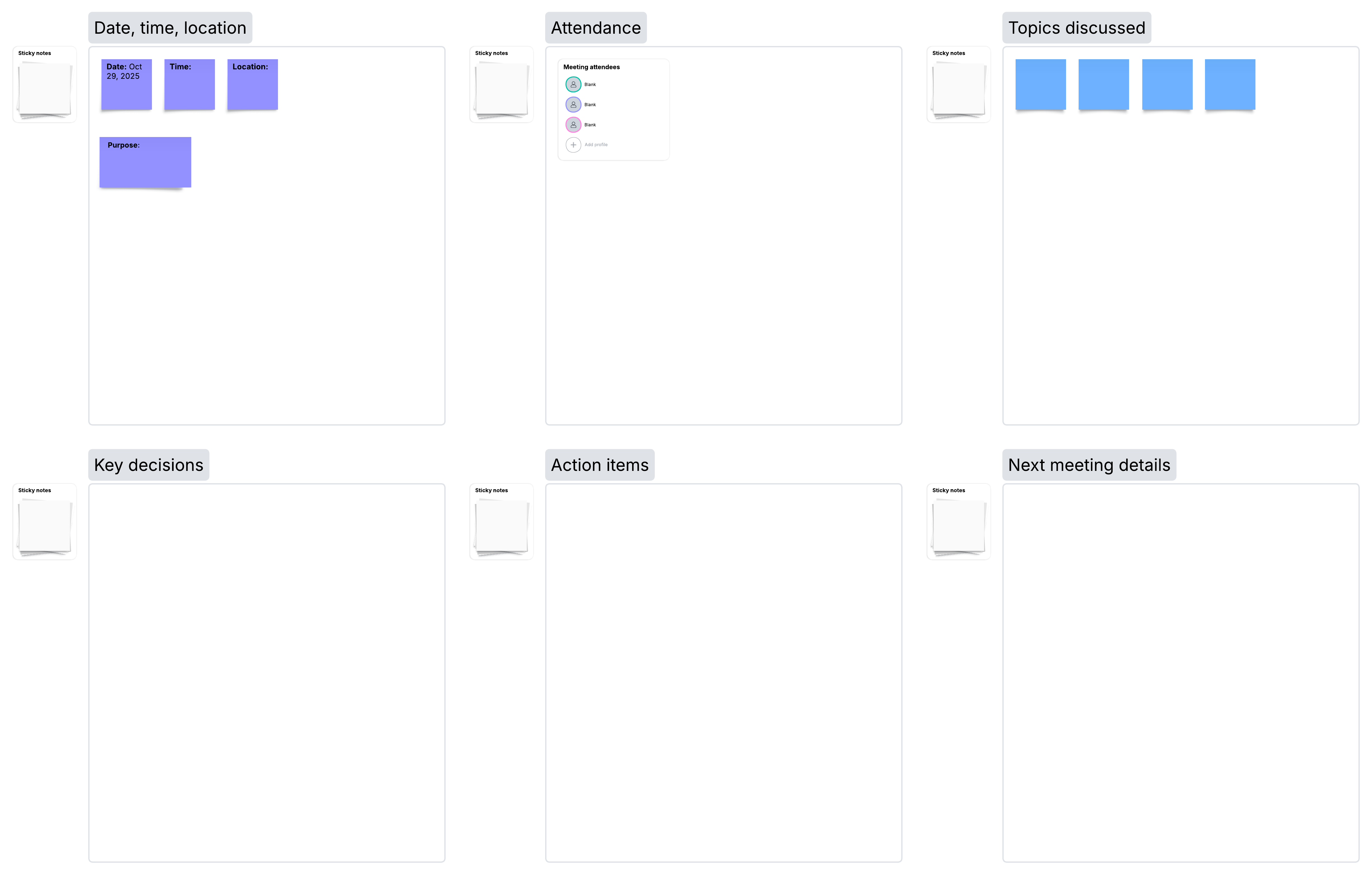
Think through how you’ll organize your notes. It’s all about finding the best method and style for you and your team. Starting with a meeting minutes template can make this first step easier.

Maximize the efficiency of your documentation with this meeting minutes template. Click on the image to modify it online.

2. Start with the basics

You’ll want to start by recording the details as the meeting begins. Include the meeting’s date, time, and location. Add attendees and note if anyone is absent. If the meeting is large or you aren’t sure of everyone’s names, consider passing around an attendance sheet.

3. Document the meeting minutes

Time to get writing! Note anything important to remember later, like decisions made, next steps assigned, and actions taken. Include details like key dates, follow-up items, or takeaways from the session as a whole. Don’t forget to include any tabled discussion items that need to be followed up on later.

If resources (documents, slide decks, or other relevant links) are presented during the meeting, make a note so you remember to request and attach them to your minutes later. 

4. Edit the meeting minutes

Regardless of how strategically you approached taking meeting minutes,  you’ll need to make some edits afterward. Review your notes. They should be clear, easy to follow, and well-organized. Add additional context, attach links to any documents presented, and omit any notes that seem unimportant or redundant.

Don’t forget to proofread and review from the perspective of someone who couldn’t attend, ensuring they could follow the minutes clearly.

5. Share the meeting minutes

Some organizations require a formal approval of completed meeting minutes to check for discrepancies before they’re shared, so don’t forget this critical step if it applies to you.

After everything is polished and approved (when necessary), it’s time to share with your team. Lucid makes sharing easy, with options to add contributors directly to the board, copy a link, or even export the board and share it as a document.

Explore different ways to easily share Lucidspark boards with collaborators.

Go now

Tips for creating effective meeting minutes

While you can adopt the way you take meeting notes for the needs of your organization, here are some helpful considerations you’ll want to keep in mind regardless:

  1. Request clarification in the meeting: If you feel unsure about what was decided in a discussion or couldn’t understand a speaker, don’t hesitate to ask. This is the only way to ensure the meeting minutes are accurate and helpful.

  2. Don’t go overboard: Meeting minutes shouldn’t be a word-for-word script of the meeting proceedings, unless verbatim minutes are specifically requested. It’s easy to go overboard, but keep it clear and straightforward. Stick with decisions made, action items, and next steps.

  3. Establish style norms: Initially, you’ll want to try different styles and techniques to determine the best way to record meeting minutes in your organization. But once you do, create a uniform style guide to maintain consistency between documents.

Create meeting minutes with Lucid

Regardless of how you approach minutes, they can be a valuable tool for accountability and transparency on your team. Lucid can help you with every step of the process, from templates that kickstart your work to collaboration features that make it easy to add context and get feedback. Seamlessly create, edit, and share meeting minutes in Lucid for greater visibility and efficiency.

Explore dynamic templates for your next meeting or workshop.

Check them out

About Lucidchart

Lucidchart, a cloud-based intelligent diagramming application, is a core component of Lucid Software's Visual Collaboration Suite. This intuitive, cloud-based solution empowers teams to collaborate in real-time to build flowcharts, mockups, UML diagrams, customer journey maps, and more. Lucidchart propels teams forward to build the future faster. Lucid is proud to serve top businesses around the world, including customers such as Google, GE, and NBC Universal, and 99% of the Fortune 500. Lucid partners with industry leaders, including Google, Atlassian, and Microsoft. Since its founding, Lucid has received numerous awards for its products, business, and workplace culture. For more information, visit lucidchart.com.

Related articles

  • How to plan more effective meetings with a weekly team agenda

    Run team meetings more effectively with an agenda. Try these tips on using a weekly team agenda and its benefits. Weekly agenda template included!

  • How to ask better questions during Agile team meetings

    Asking the right questions during Agile team meetings can encourage teamwork and show your team members how to think through challenges using the Agile framework. Learn how to do it.

  • How to plan more effective meetings with a weekly team agenda

    Run team meetings more effectively with an agenda. Try these tips on using a weekly team agenda and its benefits. Weekly agenda template included!

Bring your bright ideas to life.

Sign up free
Sign in with GoogleGoogleSign in with MicrosoftMicrosoftSign in with SlackSlack

By registering, you agree to our Terms of Service and you acknowledge that you have read and understand our Privacy Policy.

Get started

  • Pricing
  • Individual
  • Team
  • Enterprise
  • Contact sales
PrivacyLegalCookie privacy choicesCookie policy

© 2026 Lucid Software Inc.