Log in

Process vs. procedure: the secret to seamless collaboration [+ flowchart]

Reading time: about 2 min

Topics:

  • Process improvement

You’ve got sharp people, smart tools, and clear goals. So why do projects get derailed? It’s likely due to miscommunication. Ineffective communication is often the root cause of workplace failures and mishaps, which can sink your organization. With different perspectives and skillsets, it is critical to ensure that processes and procedures are well-defined.

Having a clear understanding of both process and procedure can quickly improve team communication, reduce friction, and boost alignment.

This article clarifies process vs. procedure and gives practical examples of both. We’ve also included a flowchart to help you differentiate the two throughout your work and improve cross-functional collaboration.

The difference between process and procedure

First, let’s define process and procedure.

What is a process? A process is a series of actions and tasks that produce an outcome. Say that you want to launch a new product feature. The process might look like this:

What is a procedure? A procedure is a set of instructions for completing a task within a process. In the image above, we see that the process for launching a new feature starts with developing a scope. One of the flowchart shapes says, “hold kickoff meeting.” There is a procedure for holding a kickoff meeting that involves numerous steps. See below:

Don’t let complex processes confuse your team. Explore our guide on business process improvement.

See now

Examples of process vs. procedure

Understanding the difference between process and procedure is important because it can drastically improve communication and team alignment. By clearly defining the high-level process, it is easier to communicate the detailed procedures with confidence.

When neither process nor procedure is clearly defined, though, chaos ensues. 

Technical teams may communicate in process while other organizations think in procedure, leading to miscommunication. Let's look at some examples to more concretely understand the differences and how process and procedure work together.

Take the guesswork out of mapping your processes and procedures with Lucidchart.

Try free

Examples of processes

Employee onboarding

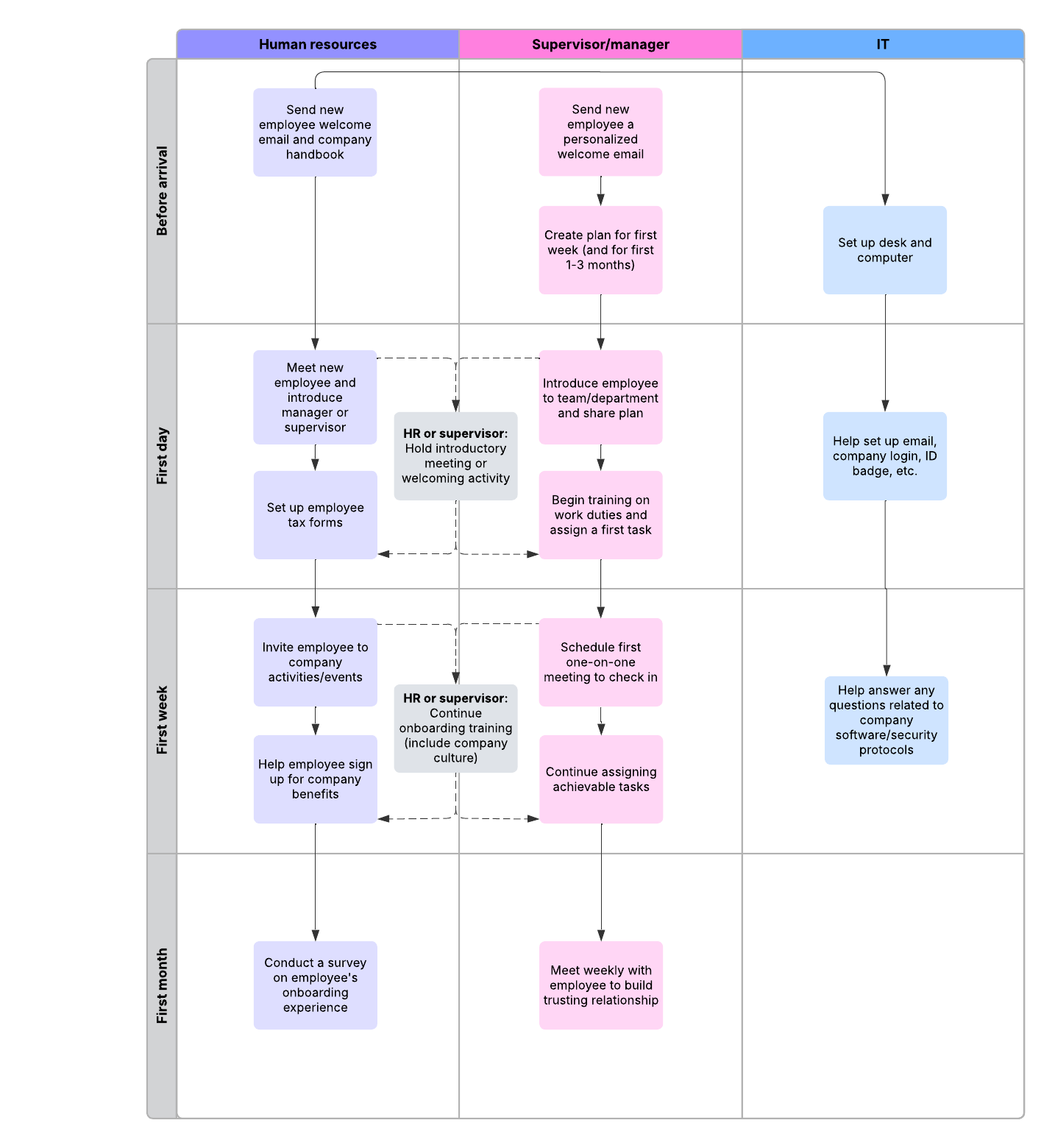
Hopefully, when new employees are hired at a company, they go through onboarding. This process walks new hires through company policies, workflows, team norms, and more so that they are set up for success in their new role. 

Onboarding process flow example (for team and enterprise users)

Sales cycle

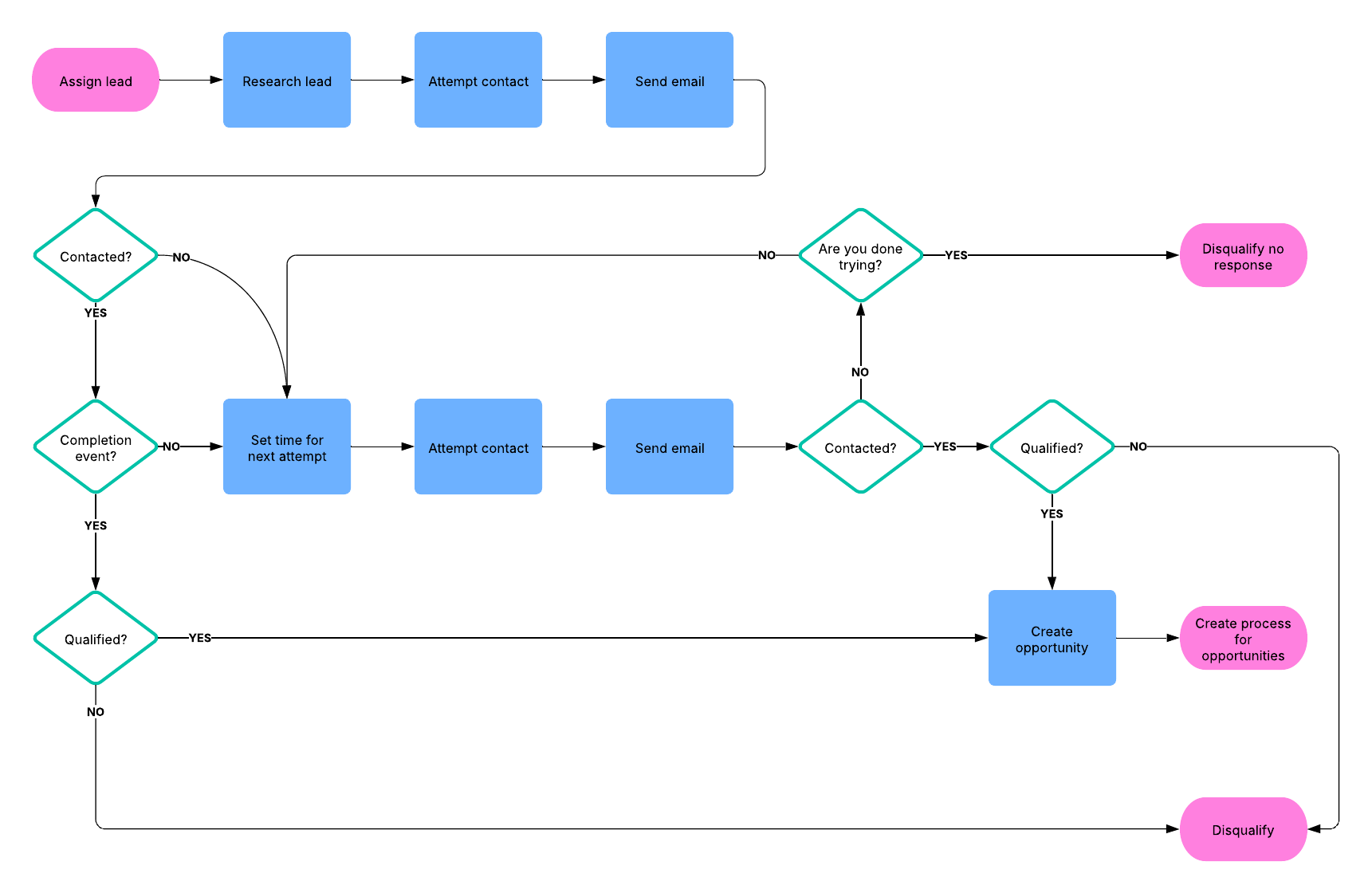
The sales process is relatively the same from company to company. It likely looks something like this:
Sales process example (for team and enterprise users)

Starting from the beginning, a rep is assigned a lead and then, through the sales process, they determine if they are qualified or if they are disinterested.

Examples of procedures

Employee onboarding

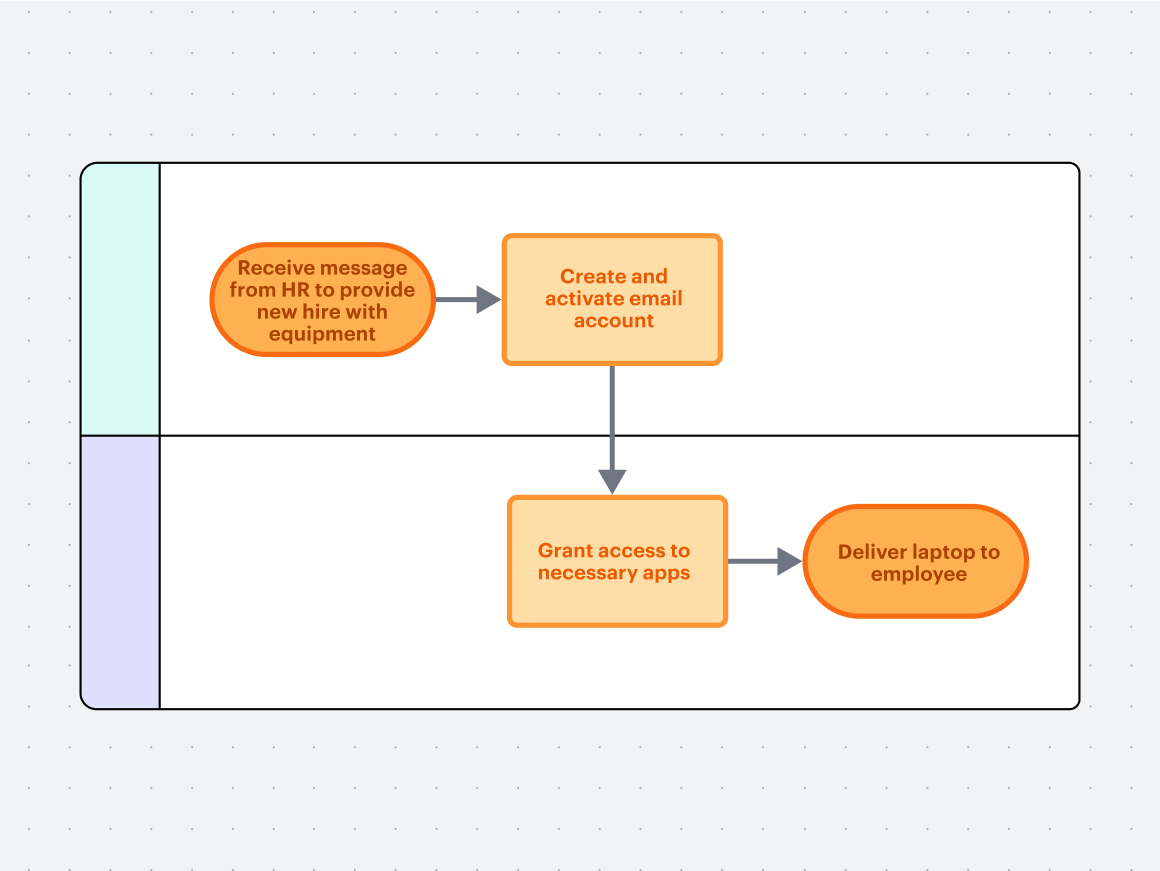
Part of the employee onboarding process involves getting employees’ laptops set up and connected to the company VPN. This is a procedure. The IT team receives a message from HR notifying them of a new hire and to provide them with the right equipment. They must also create and activate the new hire’s email account, give them access to apps, and deliver the laptop to the employee.

Sales cycle

One of the final steps in the sales process is to close the deal. After the initial “yes” from the lead, the sales rep must follow a procedure to finalize the deal. That process could look like:
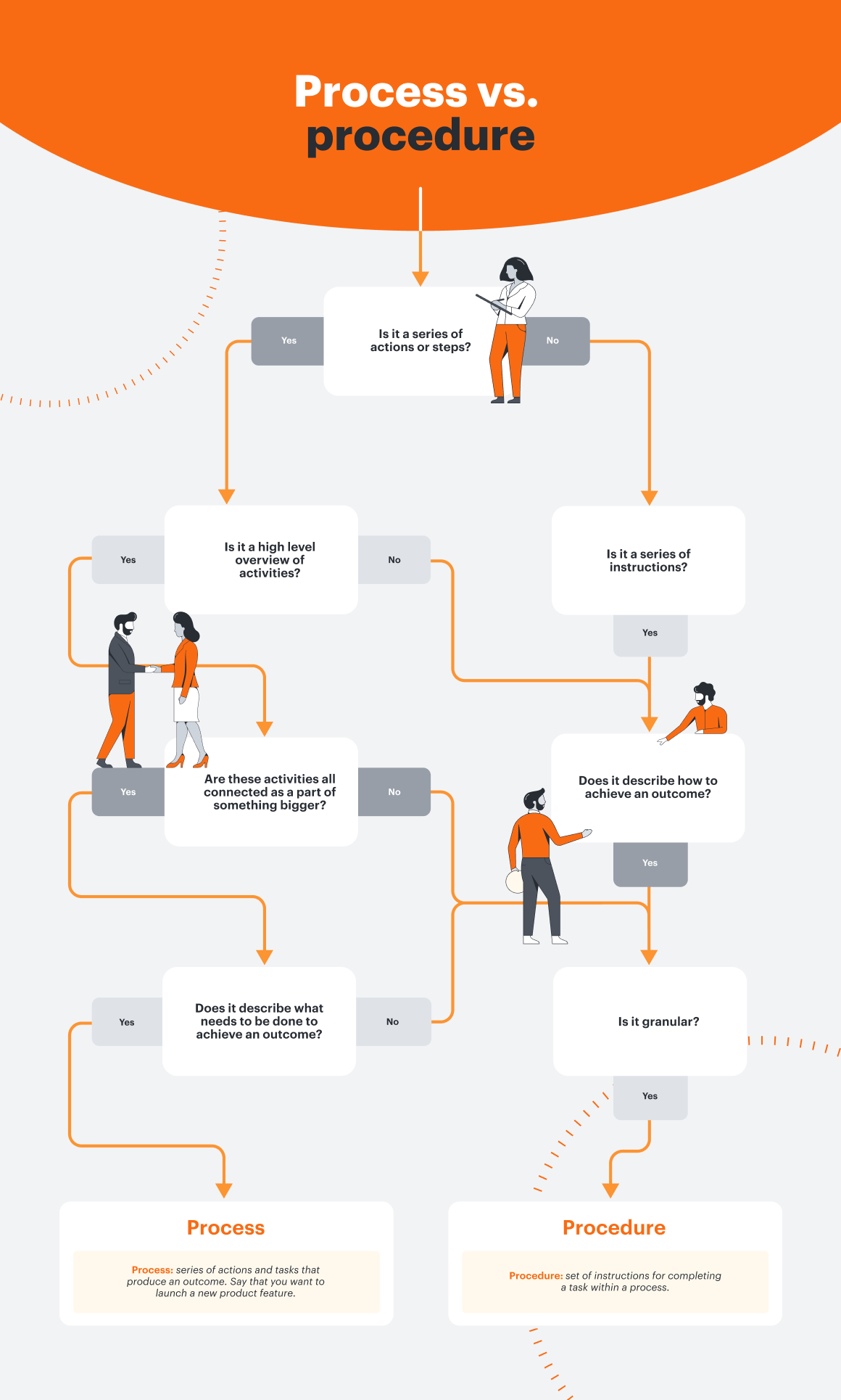
Now that you know the difference between process vs. procedure, it’s time to start mapping your procedures to enhance alignment within your organization. Use our free template today.

Open template

About Lucidchart

Lucidchart, a cloud-based intelligent diagramming application, is a core component of Lucid Software's Visual Collaboration Suite. This intuitive, cloud-based solution empowers teams to collaborate in real-time to build flowcharts, mockups, UML diagrams, customer journey maps, and more. Lucidchart propels teams forward to build the future faster. Lucid is proud to serve top businesses around the world, including customers such as Google, GE, and NBC Universal, and 99% of the Fortune 500. Lucid partners with industry leaders, including Google, Atlassian, and Microsoft. Since its founding, Lucid has received numerous awards for its products, business, and workplace culture. For more information, visit lucidchart.com.

Related articles

  • Process map templates and examples

    Show—don’t tell—the steps of your workflow with a process map. You can get started quickly with our process map templates!

  • How to write a standard operating procedure that makes sense

    A standard operating procedure includes step-by-step instructions explaining how to complete routine complex tasks and operations, typically to ensure consistency and improve efficiency. See how an SOP differs from a simple process and how you can write an effective one.

  • 9 pro tips for building process flows in Lucidchart

    In Lucidchart, you can build process flows more quickly and effectively. Get started now with these tips and tricks, including creating a custom shape library, adding links to external documentation, and assigning a status to your document.

  • How to effectively gather team feedback for improving processes

    In this article, we’ll discuss how to streamline feedback loops, minimize rounds of revision and duplicative work, and continue to simplify and improve processes. 

Bring your bright ideas to life.

Sign up free
Sign in with GoogleGoogleSign in with MicrosoftMicrosoftSign in with SlackSlack

By registering, you agree to our Terms of Service and you acknowledge that you have read and understand our Privacy Policy.


Get started

  • Pricing
  • Individual
  • Team
  • Enterprise
  • Contact sales
PrivacyLegalCookie privacy choicesCookie policy

© 2026 Lucid Software Inc.