
Learn everything you need know about workflows, from history and use cases to symbols and tutorials. We'll even show you how to create a professional workflow diagram using our workflow diagram software equipped with all the shapes, icons, and features you need to get started.
8 minute read
Want to make a Diagram of your own? Try Lucidchart. It's quick, easy, and completely free.
What is a workflow diagram?
A workflow diagram (also known as a workflow) provides a graphic overview of the business process. Using standardized symbols and shapes, the workflow shows step by step how your work is completed from start to finish. It also shows who is responsible for work at what point in the process. Designing a workflow involves first conducting a thorough workflow analysis, which can expose potential weaknesses. A workflow analysis can help you define, standardize and identify critical areas of your process.
Workflows are also useful to help employees understand their roles and the order in which work is completed, and to create more unity within different departments. Originating from the manufacturing industry, workflows are now used by a variety of industries—from government to finance to commerce—and are easier than ever to create.
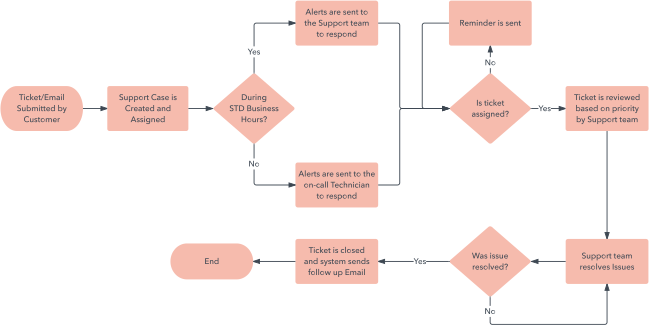
Common related terms
The term “workflow” is sometimes confused with other similar terms:
Flowchart: A flowchart is the actual chart that illustrates your workflow. Flowcharts are used to depict a variety of concepts, including workflows.
Business process mapping: Think of workflow as a simple, step-by-step, linear process with no optimization. Workflow is just one part of business process mapping, which uses a holistic approach to coordinate and map all of the different activities, data, systems and people involved in a business process.
History of the workflow diagram
The origins of the modern-day workflow can be traced back to the late 1880s, and the first time the term “workflow” was presented was in a railway engineering journal in 1921. The so-called founding fathers of workflows, Frederick Winslow Taylor, a leading proponent of what’s known as scientific management, and mechanical engineer and management consultant Henry Gantt, are credited with being among the first to study the rational organization of labor—particularly in the manufacturing industry. As the workplace grew more technologically sophisticated, with the advent of the copier and the typewriter, the ability to further explore and spread knowledge of the workflow system also expanded.
Two major events contributed to the need for rational organization of work: the growing field of optimization theory, and World War II and the Apollo program. The 1980s were also a burgeoning time for workflows, as the idea of total quality management became popular and companies aimed to become globally competitive. Workflows helped total quality management efforts, as well as Six Sigma—a movement that serves to identify and remove defects in the manufacturing and business process.
When to use a workflow diagram?
While workflow diagrams originated in the manufacturing industry, there are a variety of other industries that can benefit from a workflow. Here are a few examples:
Medical: A hospital can use a workflow diagram to depict the steps taken in an emergency room visit.

Military: Workflow diagrams can show the steps taken during a deployment operation.
Finance: From payment processing to collections and purchase orders, workflow diagrams can be a useful tool to document your process.

Education: One example is using workflow diagrams to show the steps that a university student takes to enroll.
E-commerce: A workflow diagram can show the process a customer goes through, from ordering to receiving final product.
A workflow provides a visual representation of an entire process, which helps you not only understand it more thoroughly but also pinpoint potential problems or bottlenecks before they happen. They’re also useful if you’re trying to track metrics for a process, improve a process by eliminating inefficiencies, or automate a manual process. Workflows are also useful for employees to understand their particular roles and how they relate to other departments, which can lead to better communication and more cohesiveness.
Diagramming is quick and easy with Lucidchart. Start a free trial today to start creating and collaborating.
Make a diagramSteps to create a workflow diagram: from analysis to design
There are several steps required to create a successful workflow diagram.
1. First, determine what point of view you are diagramming for: the business or its customers. Also, are you showing how the process currently works—known as the "as is" process? Or are you showing the “to be” process—how you want the new implementation to look?
2. Next, you’ll want to design a rough sketch of your current business process. Consider this a general overview that shows high-level steps in your process—work or activities that happen repeatedly in your organization.
3. After you’ve created your initial diagram, you’re ready to dive into the details. This is the requirements gathering phase, where you’ll obtain information from the people involved in each step.
During this phase, ask your employees the following:
- What’s your overall goal?
- What signals the beginning and end of the business process?
- What activities are involved in each step, and who is involved in them?
- What happens next?
- Are there any deviations from this process?
- During decision points—for approval or denial—what information does the worker need to know in order to make a decision?
4. After you have all the information you need, conduct a workflow analysis, keeping these three steps in mind to help eliminate inefficiencies:
- Categorize: One way to quickly pinpoint weak areas is to rank tasks based on importance: “vital,” “useful,” “nice but not necessary,” and “should eliminate.” Divide tasks by job description to ensure that the tasks are aligned with the appropriate job title and level of expertise.
- Pinpoint weak areas: Look for redundancies, bottlenecks, double data entry and multiple steps that cause delays.
- Think ahead: A workflow analysis is also a good time to ensure that your company is aligning with future goals. What are your company’s goals for the next five years? What tasks are required to reach those goals, and are they represented in your current workflow?
5. Now you’re ready to design! To make it easy you can start with Lucidchart when you sign up free and try out our templates, then add shapes and text to customize the workflow.
Types of workflow diagrams
There are a variety of ways to display a workflow. Here are the most popular workflow diagrams:
- ANSI flowchart: Using symbols from the American National Standards Institute, the ANSI style was the first standard for workflows and provides a common language for describing the different steps involved.
- UML Activity: Using the Unified Modeling Language, the UML Activity diagram is used to graphically represent the order of steps in a process, and the flow of control.
- BPMN: Standing for Business Process Modeling Notation, BPMN uses a flowchart technique similar to UML. It serves as a common language for both technical users and business users. It focuses on business process and information—such as internal processes—rather than output.
- Swimlane: A swimlane diagram separates each unit within the organization, highlighting their interaction and providing a high-level view of possible inefficiencies.
- SIPOC: This acronym stands for Supplier-Input-Process-Output-Customer, which clearly shows who creates and receives the data and outlines the high-level process involved.

Common symbols and shapes
Workflows use specific shapes and symbols to represent steps and actions throughout the process. Common symbols and shapes include:
 | Oval | Signifies the starting and ending points of the process. |
 | Rectangle | Denotes instructions or actions. |
 | Diamond | Indicates where a decision must be made, after which the workflow proceeds in two separate paths after a "yes" or "no" decision. |

| Circle | Used as a connector item when a leap is made from one section to another, separated by arrows. |
 | Arrow | Points toward the next step. |
Components of a workflow diagram
Each element of a workflow is designed to illustrate the flow between each step. Each step includes one of three parameters:
- Input: the labor, capital, equipment or information that’s required to complete the step.
- Transformation: the changes that create the output, such as location, physical characteristics, change in ownership or purpose.
- Output: the result of the transformation.
5 workflow improvement theories
In the 1980s, the work of W. Edwards Deming and Joseph M. Juran—both engineers and management consultants—gave rise to a variety of theories on improving business process workflow that are still used today, including:
-
Six Sigma: Using a mathematical equation based on statistical theory, Six Sigma aims to eliminate errors in final products—aiming for no more than 3.4 defects per million in manufacturing. Emphasizing quality improvement at every level, Six Sigma involves observing, analyzing and experimenting with the process. Two popular methods are DMADV (Define, Measure, Analyze, Design, Verify) and DMAIC (Define, Measure, Analyze, Improve, Control).
-
Total Quality Management: This theory aims to improve product quality as well as work environment, emphasizing better communication and cooperation between departments and employees.
-
Business Process Reengineering: Using algorithms to analyze every level, Business Process Reengineering involves rethinking the entire business process according to changing conditions.
-
Lean Systems: This theory zeroes in on eliminating excess overhead and waste, creating a “lean” organization in order to stay competitive to market changes and instability.
- Theory of Constraints (TOC): This theory aims to identify the weakest link—the constraint—and eliminate it.